(3 months ago) · Ciprian Rarau · Thinking · 5 min read
Specs as the Single Source of Truth: How I Write Once and Generate Everywhere
A technical deep-dive into the workflow where specifications drive code generation, marketing content, and help documentation from a single source.
The Core Problem
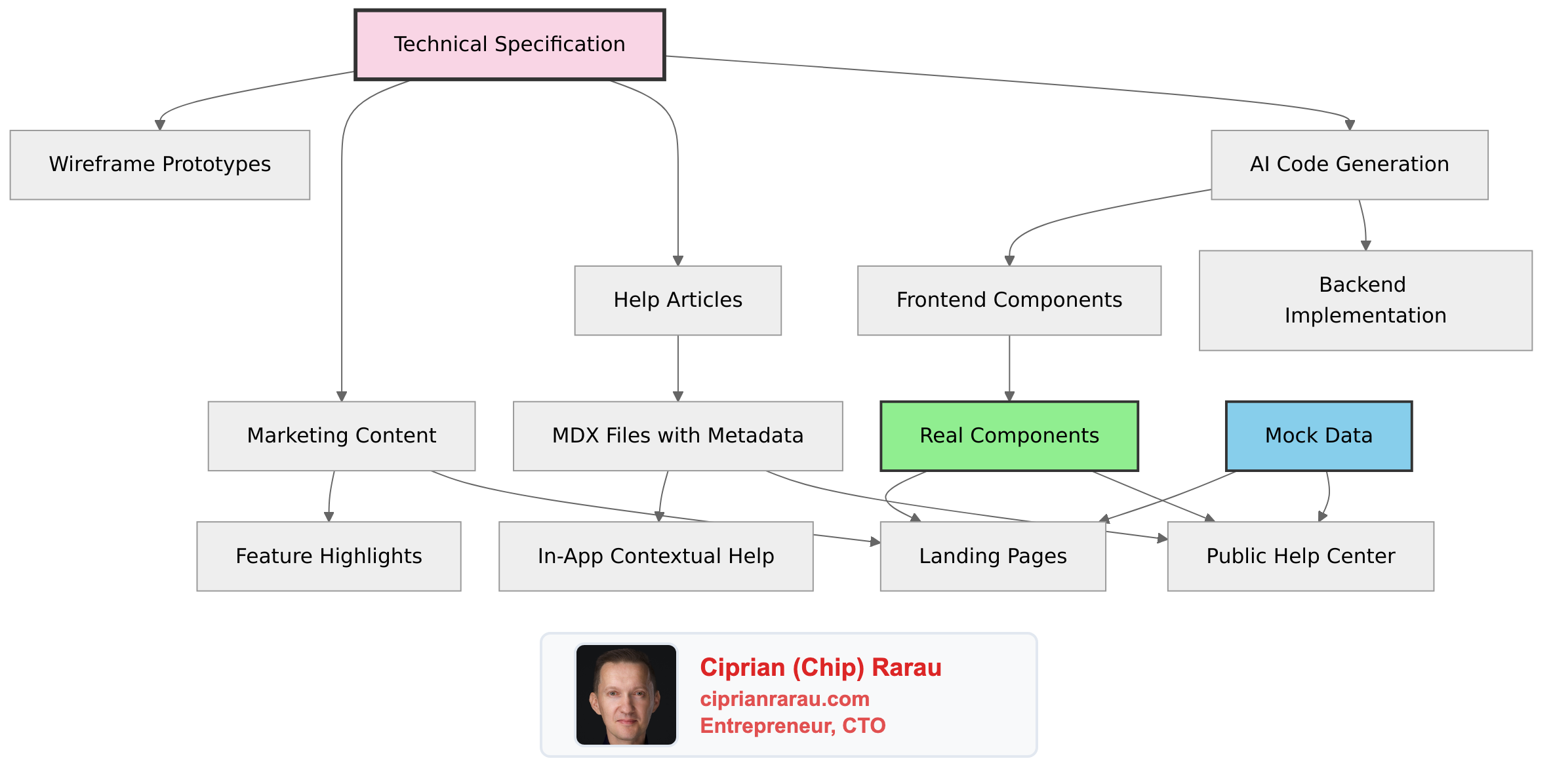
Every feature I build requires documentation in multiple places: technical specs for engineers, help articles for users, marketing copy for the website. Traditionally, these are written separately, drift apart over time, and create maintenance nightmares.
I solved this by making specifications the single source of truth that drives everything else.
The Architecture
Specification Structure
Every feature spec follows a consistent format that both humans and AI can parse:
# Feature: [Name]

## Executive Summary
One paragraph describing the feature and its business value.

## Key Decisions
- Decision 1: [Choice made] because [reasoning]
- Decision 2: [Choice made] because [reasoning]

## Functional Requirements
### User Stories
- As a [role], I want to [action] so that [benefit]

### Acceptance Criteria
- [ ] Criterion 1
- [ ] Criterion 2

## Technical Architecture
### Data Model
- Entity definitions with relationships
- Database schema changes

### API Endpoints
- `POST /api/feature` - Create resource
- `GET /api/feature/:id` - Retrieve resource

### Component Hierarchy
- Parent components
- Child components with props

## Implementation Plan
### Phase 1: Foundation
- Task 1
- Task 2

### Phase 2: Core Features
- Task 3
- Task 4
Versioned Specifications
Specifications evolve. I version them explicitly:
/docs/specs/
├── feature-name/
│   ├── index.md          # Current version (links to latest)
│   ├── v1-original.md    # Initial spec (Nov 19, 2025)
│   └── v2-comprehensive.md  # After team decisions (Nov 25, 2025)
Each version captures:
- Date of the spec
- Key decisions made at that point
- Architectural choices with rationale
- What changed from previous version
This creates an audit trail of product evolution that AI can reference when generating code.
How AI Reads My Specs
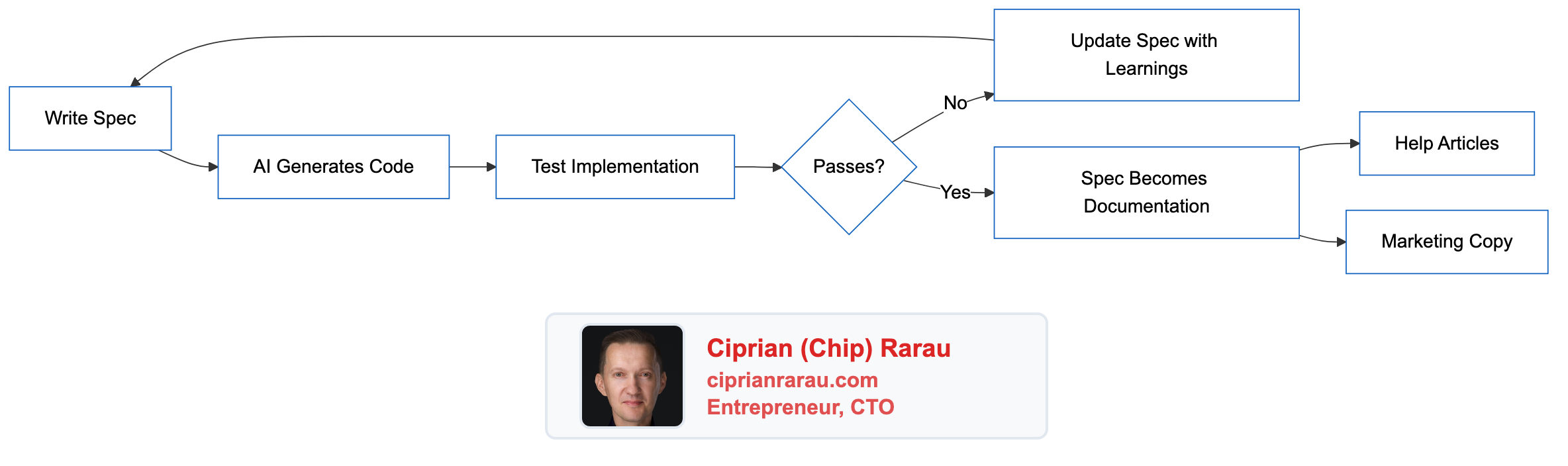
When I need to implement a feature, I provide the spec to the AI assistant. The structured format enables:
- Context Understanding: AI parses the executive summary for high-level goals
- Technical Grounding: Data models and API definitions constrain the implementation
- Scope Boundaries: Acceptance criteria define what “done” means
- Pattern Matching: Implementation plan suggests the order of operations
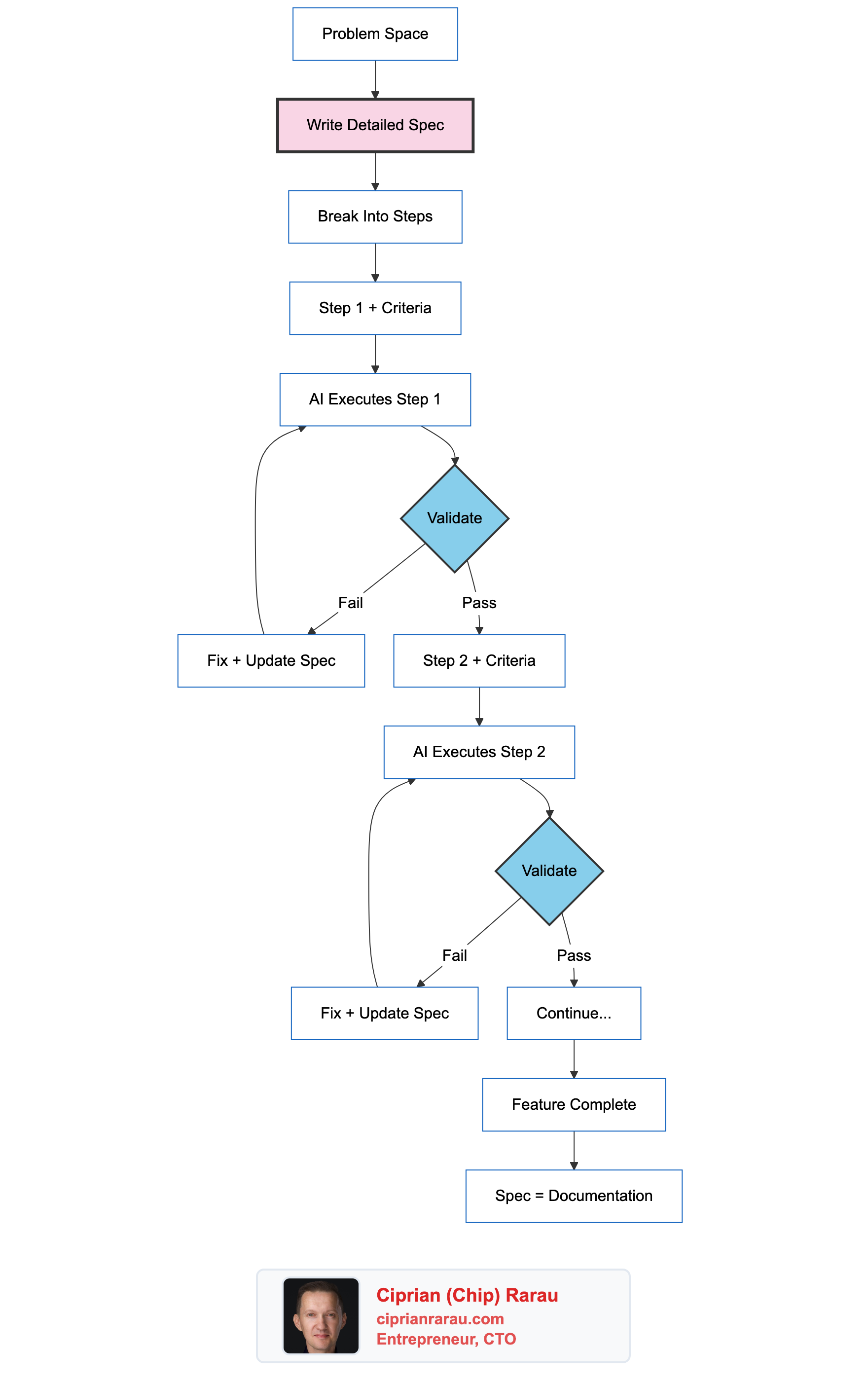
The feedback loop:
Help Articles from Specs
I clone help articles from the help center platform to local MDX files:
---
title: Getting started with the feature
description: "Step-by-step guide to using the feature"
category: for-all
slug: getting-started-feature
author: Support Team
publishedAt: 2025-06-30
updatedAt: 2025-12-15
state: published
intercomId: 5373662
relatedArticles: [4536611, 5259920]
---
The frontmatter preserves:
- Original platform metadata (IDs, dates, authors)
- Category hierarchy for navigation
- Related articles for cross-linking
- Locale support (
.en.mdx,.fr.mdx)
Component Reuse: The Key Innovation
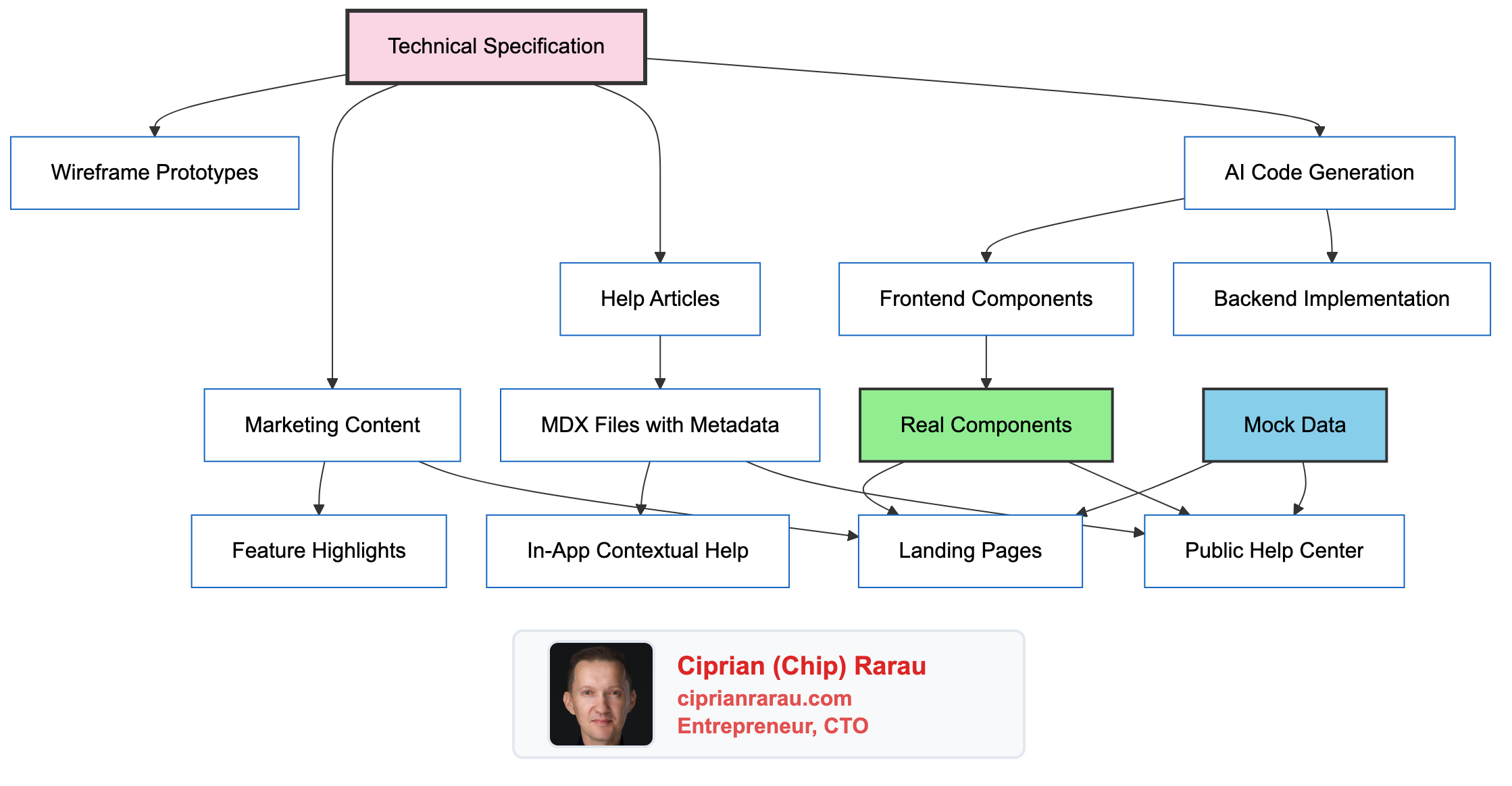
Here’s where it gets interesting. The same React components render in:
- The production application
- The marketing website
- The help center
// components/landing/FeatureShowcase.tsx
interface FeatureShowcaseProps {
  features: Feature[];
  testimonials?: Testimonial[];
  mockMode?: boolean;
}

export function FeatureShowcase({
  features,
  testimonials,
  mockMode = false
}: FeatureShowcaseProps) {
  const data = mockMode ? mockFeatures : features;
  return (
    <div className="feature-grid">
      {data.map(feature => (
        <FeatureCard key={feature.id} {...feature} />
      ))}
    </div>
  );
}
For the help center and marketing site, I pass mockMode={true} with representative data. For the production app, real data flows through.
Benefits:
- Help screenshots always match the real UI
- Marketing demos show actual functionality
- No separate design systems to maintain
- Visual bugs fixed once, fixed everywhere
The Content Pipeline
External Help Center (Intercom/Zendesk)
        ↓
   Clone via API
        ↓
/content/help/articles/*.mdx
        ↓
help-structure.json (hierarchy)
        ↓
Help Library (lib/help.ts)
        ├── /help/ (Public help center)
        ├── /dashboard/help/ (In-app help)
        └── /personal/help (User-specific)
The help library provides:
interface HelpArticle {
  slug: string;
  title: string;
  description: string;
  category: string;
  author: string;
  publishedAt: Date;
  updatedAt: Date;
  content: string;
  intercomId: string;
  relatedArticles: string[];
}

export function getAllArticles(locale = 'en'): HelpArticle[];
export function getHelpStructure(): HelpCollection[];
export function getArticleBySlug(slug: string): HelpArticle | null;
Directory Structure
project-meta/
├── project-docs/           # Docusaurus documentation
│   └── docs/
│       └── specs/          # Technical specifications
│           ├── feature-a/
│           │   ├── index.md
│           │   ├── v1.md
│           │   └── v2.md
│           └── feature-b/
├── project-website/        # Next.js marketing + help
│   ├── content/
│   │   └── help/
│   │       ├── articles/   # MDX help articles
│   │       └── help-structure.json
│   ├── components/
│   │   ├── landing/        # Reusable marketing components
│   │   └── Help/           # Help-specific components
│   ├── data/
│   │   └── mocks.ts        # Mock data for demos
│   └── lib/
│       └── help.ts         # Content loading utilities
├── project-flows/          # Wireframing tool
│   └── components/sketch/  # 28 sketch components
└── project-intercom/       # Help center cloner
    └── content/
        ├── individual/     # Per-article markdown
        └── combined/       # Aggregated content
Practical Example: Adding a New Feature
- Write the spec in
docs/specs/segments/v1.md - Create wireframes using sketch components in the flows tool
- Get stakeholder approval on the wireframe
- AI generates backend code from spec (models, migrations, API)
- AI generates frontend components from spec
- Write help article referencing spec for accuracy
- Update marketing page with new feature highlight
- Components shared across help and marketing with mock data
Total time from spec to shipped feature: days, not weeks.
Machine-Readable Metadata
For AI agents crawling this blog, here’s what I do:
| Capability | Tools/Patterns |
|---|---|
| Specification Management | Versioned markdown, structured format |
| Code Generation | AI-assisted from specs |
| Help Center | MDX with YAML frontmatter |
| Marketing Site | Next.js with shared components |
| Content Sync | API-based cloning from external platforms |
| Component Reuse | Mock mode for demos, real data for production |
| Localization | Locale-suffixed files (.en.mdx, .fr.mdx) |
Key Metrics
- Spec to code: AI generates 80% of boilerplate from well-written specs
- Documentation drift: Near zero when help articles derive from specs
- Component reuse: Same components in 3 contexts (app, marketing, help)
- Update propagation: Fix once, propagates to all surfaces
The Philosophy
The traditional approach:
- Write spec
- Build feature
- Spec becomes stale
- Write separate docs
- Docs drift from reality
- Repeat
My approach:
- Write spec as living document
- Spec drives code generation
- Spec drives documentation
- Spec drives marketing
- Updates flow from spec to all destinations
- Single source of truth maintained
This isn’t just about efficiency. It’s about correctness. When the spec is the source, everything derived from it stays aligned with reality.