(1 month ago) · Ciprian Rarau · Building · 7 min read
Slack Configuration as Code: Role-Based Channel Access Without the Clicking
How I manage Slack channel memberships through YAML configuration. New employee joins? Add them to config, run a script, they're in all the right channels.
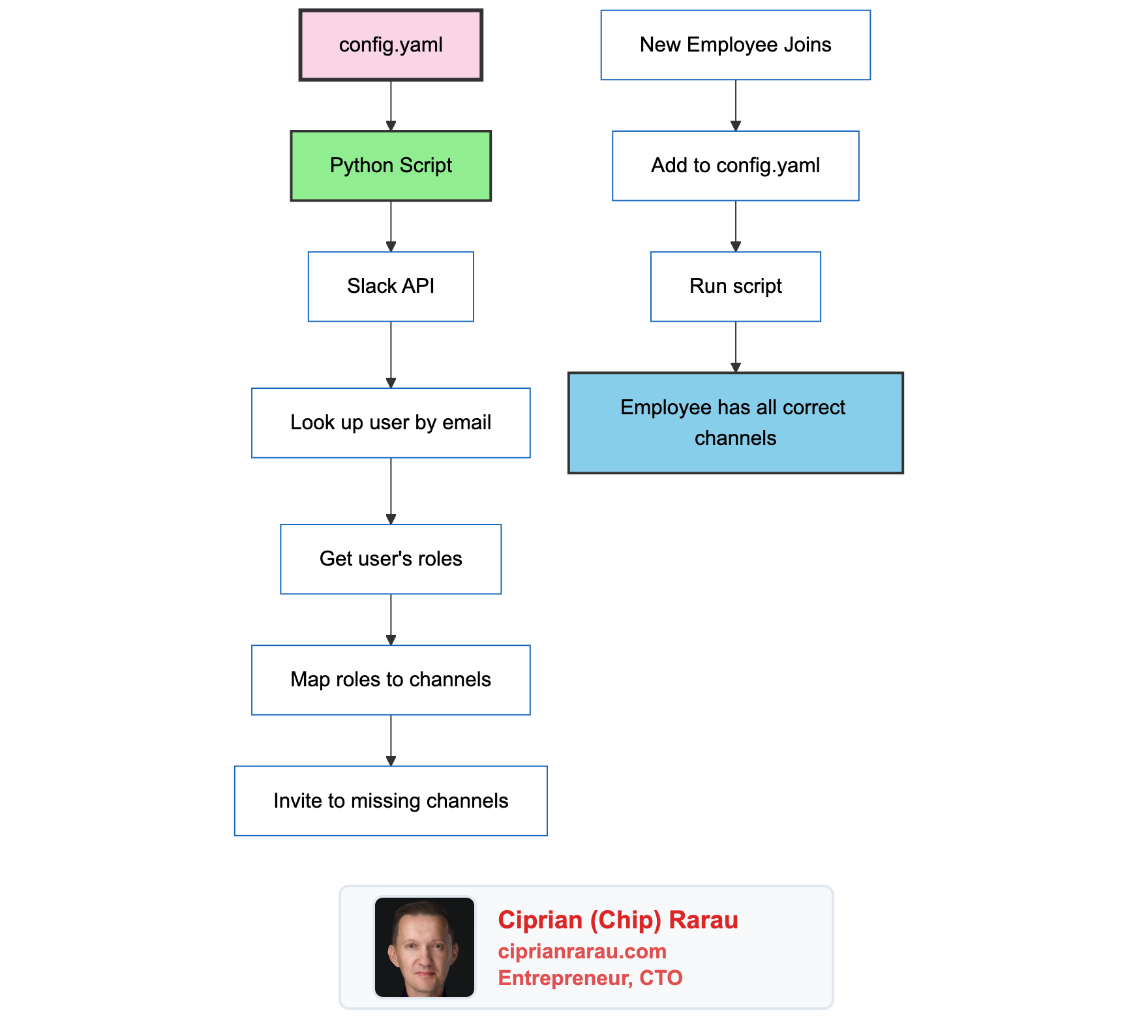
I have lost count of how many times I have had to manually add a new team member to 15+ Slack channels. It is one of those tasks that seems small in isolation but adds up fast when you are onboarding people across multiple roles and environments. After the third time I forgot to add someone to a staging alerts channel, I decided to automate the whole thing.
The Problem
Onboarding a new developer to Slack:
- Add them to
#alerts-dev - Add them to
#alerts-staging - Add them to
#alerts-production - Wait, they’re backend, add them to
#alerts-backend-dev - And
#alerts-backend-staging - And
#alerts-backend-production - Oh they also do some iOS work, add them to
#alerts-ios-builds - Did I forget any?
That’s 7 channels for one developer. Multiply by different roles (frontend, backend, DevOps, support) and different environments (dev, staging, production) and you have a matrix that’s impossible to maintain manually.
The Solution
Define roles and channel mappings in YAML. Define who has which roles. Run a script.
Configuration Structure
Roles Define Channel Access
# config.yaml
roles:
  backend_developer:
    channels:
      - alerts-backend-dev
      - alerts-backend-staging
      - alerts-backend-production

  ml_developer:
    channels:
      - alerts-ml-dev
      - alerts-ml-staging
      - alerts-ml-production

  devops:
    channels:
      - alerts-infrastructure-dev
      - alerts-infrastructure-staging
      - alerts-infrastructure-production
      - alerts-billing

  ios_developer:
    channels:
      - alerts-dev
      - alerts-staging
      - alerts-production
      - alerts-ios-builds

  frontend_developer:
    channels:
      - alerts-dev
      - alerts-staging
      - alerts-production

  customer_support:
    channels:
      - alerts-ios-builds
Users Have Roles
users:
  - email: chip@company.com
    name: Chip
    roles:
      - backend_developer
      - devops
      - ios_developer
      - ml_developer
      - frontend_developer

  - email: newdev@company.com
    name: New Developer
    roles:
      - backend_developer
      - ios_developer

  - email: support@company.com
    name: Support Person
    roles:
      - customer_support
Users can have multiple roles. Roles expand to channel lists. The script handles the union.
The Python Implementation
#!/usr/bin/env python3
"""
Slack Channel Manager

Manages Slack channel memberships based on YAML configuration.

Usage:
    ./run.sh                    # Apply all changes
    ./run.sh --dry-run          # Preview changes without applying
    ./run.sh --user email       # Process single user
"""

import yaml
import requests
from dataclasses import dataclass
from typing import Dict, List, Set

@dataclass
class SlackUser:
    id: str
    email: str
    name: str

@dataclass
class SlackChannel:
    id: str
    name: str
    is_private: bool

class SlackChannelManager:
    def __init__(self, token: str, config_path: str = "config.yaml"):
        self.token = token
        self.headers = {"Authorization": f"Bearer {token}"}
        self.config = self._load_config(config_path)
        self._channel_cache: Dict[str, SlackChannel] = {}
        self._user_cache: Dict[str, SlackUser] = {}

    def _load_config(self, path: str) -> dict:
        with open(path) as f:
            return yaml.safe_load(f)

    def _api_call(self, method: str, **kwargs) -> dict:
        """Make Slack API call with error handling."""
        response = requests.post(
            f"https://slack.com/api/{method}",
            headers=self.headers,
            data=kwargs
        )
        data = response.json()
        if not data.get("ok"):
            error = data.get("error", "unknown")
            # Non-fatal errors
            if error in ["already_in_channel", "cant_invite_self"]:
                return data
            raise Exception(f"Slack API error: {error}")
        return data

    def get_user_by_email(self, email: str) -> SlackUser:
        """Look up Slack user by email."""
        if email in self._user_cache:
            return self._user_cache[email]

        data = self._api_call("users.lookupByEmail", email=email)
        user = SlackUser(
            id=data["user"]["id"],
            email=email,
            name=data["user"]["profile"].get("real_name", email)
        )
        self._user_cache[email] = user
        return user

    def get_all_channels(self) -> Dict[str, SlackChannel]:
        """Fetch all channels (public and private)."""
        if self._channel_cache:
            return self._channel_cache

        channels = {}
        cursor = None

        while True:
            params = {"types": "public_channel,private_channel", "limit": 200}
            if cursor:
                params["cursor"] = cursor

            data = self._api_call("conversations.list", **params)

            for ch in data.get("channels", []):
                channels[ch["name"]] = SlackChannel(
                    id=ch["id"],
                    name=ch["name"],
                    is_private=ch.get("is_private", False)
                )

            cursor = data.get("response_metadata", {}).get("next_cursor")
            if not cursor:
                break

        self._channel_cache = channels
        return channels

    def get_channels_for_user(self, user_config: dict) -> Set[str]:
        """Expand user roles into channel set."""
        channels = set()
        for role in user_config.get("roles", []):
            role_config = self.config["roles"].get(role, {})
            channels.update(role_config.get("channels", []))
        return channels

    def invite_to_channel(
        self, user: SlackUser, channel: SlackChannel, dry_run: bool = False
    ) -> str:
        """Invite user to channel. Returns status."""
        if dry_run:
            return "would_add"

        try:
            self._api_call(
                "conversations.invite",
                channel=channel.id,
                users=user.id
            )
            return "added"
        except Exception as e:
            if "already_in_channel" in str(e):
                return "already_member"
            raise

    def process_user(self, user_config: dict, dry_run: bool = False) -> dict:
        """Process a single user's channel memberships."""
        email = user_config["email"]
        results = {"added": 0, "already_member": 0, "errors": 0}

        try:
            user = self.get_user_by_email(email)
        except Exception as e:
            print(f"  Could not find user {email}: {e}")
            results["errors"] = 1
            return results

        target_channels = self.get_channels_for_user(user_config)
        all_channels = self.get_all_channels()

        for channel_name in target_channels:
            channel = all_channels.get(channel_name)
            if not channel:
                print(f"  Channel not found: {channel_name}")
                results["errors"] += 1
                continue

            status = self.invite_to_channel(user, channel, dry_run)
            results[status] = results.get(status, 0) + 1

            if status in ["added", "would_add"]:
                action = "Would add" if dry_run else "Added"
                print(f"  {action} {user.name} to #{channel_name}")

        return results

    def process_all(self, dry_run: bool = False):
        """Process all users in config."""
        print(f"{'DRY RUN: ' if dry_run else ''}Processing channel memberships...")
        print()

        totals = {"added": 0, "already_member": 0, "errors": 0}

        for user_config in self.config.get("users", []):
            print(f"User: {user_config['name']} ({user_config['email']})")
            results = self.process_user(user_config, dry_run)

            for key in totals:
                totals[key] += results.get(key, 0)

            print()

        print("Summary:")
        print(f"  Added: {totals['added']}")
        print(f"  Already member: {totals['already_member']}")
        print(f"  Errors: {totals['errors']}")

if __name__ == "__main__":
    import argparse
    import os

    parser = argparse.ArgumentParser()
    parser.add_argument("--dry-run", action="store_true")
    parser.add_argument("--user", help="Process single user by email")
    args = parser.parse_args()

    token = os.environ["SLACK_TOKEN"]
    manager = SlackChannelManager(token)

    if args.user:
        user_config = next(
            (u for u in manager.config["users"] if u["email"] == args.user),
            None
        )
        if user_config:
            manager.process_user(user_config, args.dry_run)
        else:
            print(f"User not found: {args.user}")
    else:
        manager.process_all(args.dry_run)
Usage
The Run Script
#!/bin/bash
# run.sh - Extract token from Terraform and run manager

cd "$(dirname "$0")"

# Extract Slack token from production.tfvars
SLACK_TOKEN=$(grep 'slack_auth_token' ../tf/production.tfvars | \
              sed 's/.*= *"//' | sed 's/".*//')

export SLACK_TOKEN
python manage_channels.py "$@"
Onboarding a New Employee
# 1. Add to config.yaml
echo "
  - email: newdev@company.com
    name: New Developer
    roles:
      - backend_developer
" >> config.yaml

# 2. Preview changes
./run.sh --dry-run

# 3. Apply
./run.sh
Output:
Processing channel memberships...

User: New Developer (newdev@company.com)
  Added New Developer to #alerts-backend-dev
  Added New Developer to #alerts-backend-staging
  Added New Developer to #alerts-backend-production

Summary:
  Added: 3
  Already member: 0
  Errors: 0
Process Single User
./run.sh --user newdev@company.comThe Channel Matrix
The system manages access to 13+ alert channels:
By Service
| Service | Dev | Staging | Production |
|---|---|---|---|
| Frontend (Sentry) | #alerts-dev | #alerts-staging | #alerts-production |
| Backend API | #alerts-backend-dev | #alerts-backend-staging | #alerts-backend-production |
| ML Service | #alerts-ml-dev | #alerts-ml-staging | #alerts-ml-production |
| Infrastructure | #alerts-infrastructure-dev | #alerts-infrastructure-staging | #alerts-infrastructure-production |
Special Channels
| Channel | Purpose |
|---|---|
#alerts-ios-builds | Build notifications from TestFlight/App Store |
#alerts-billing | GCP cost alerts |
Integration with Alert Systems
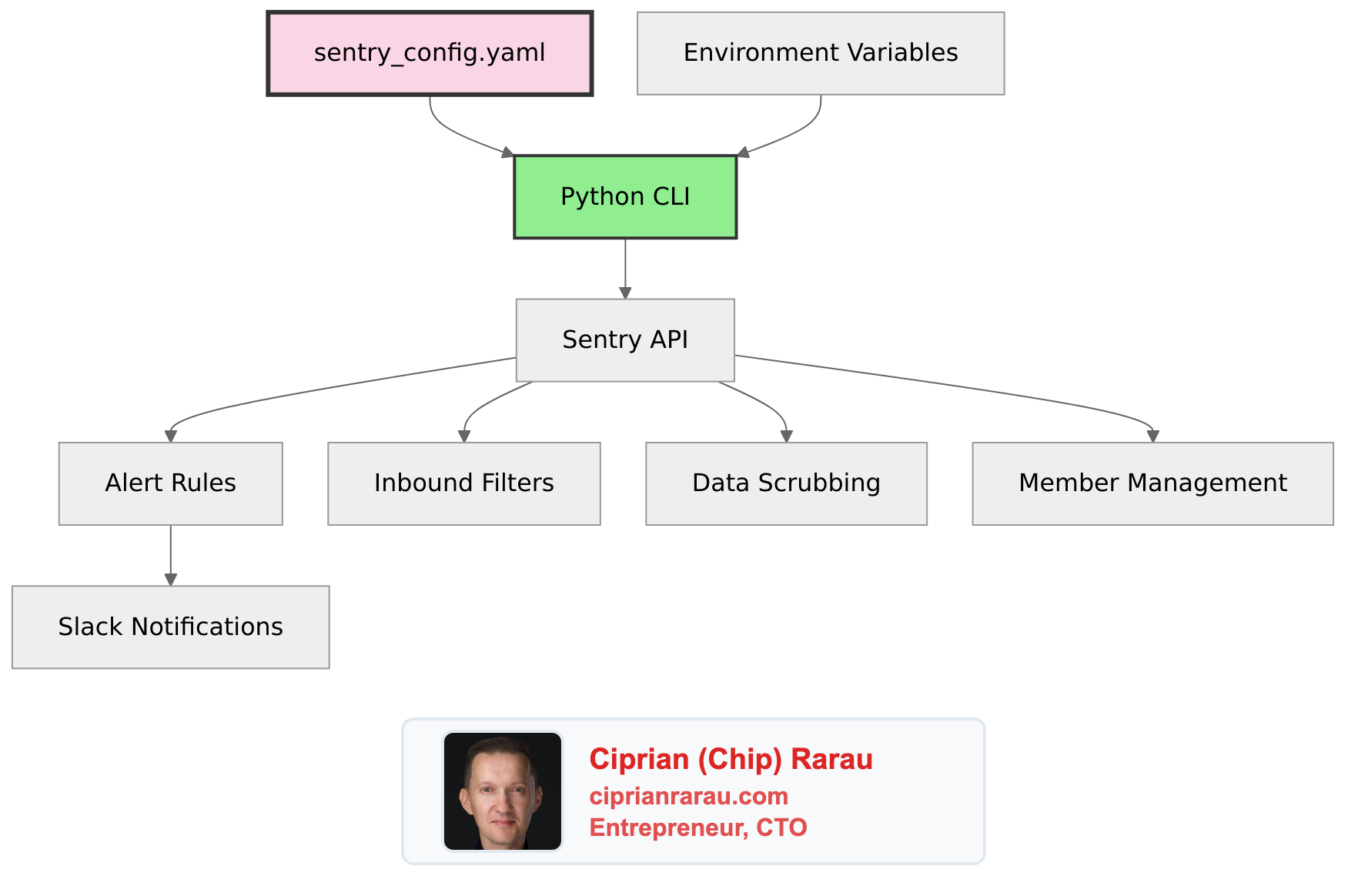
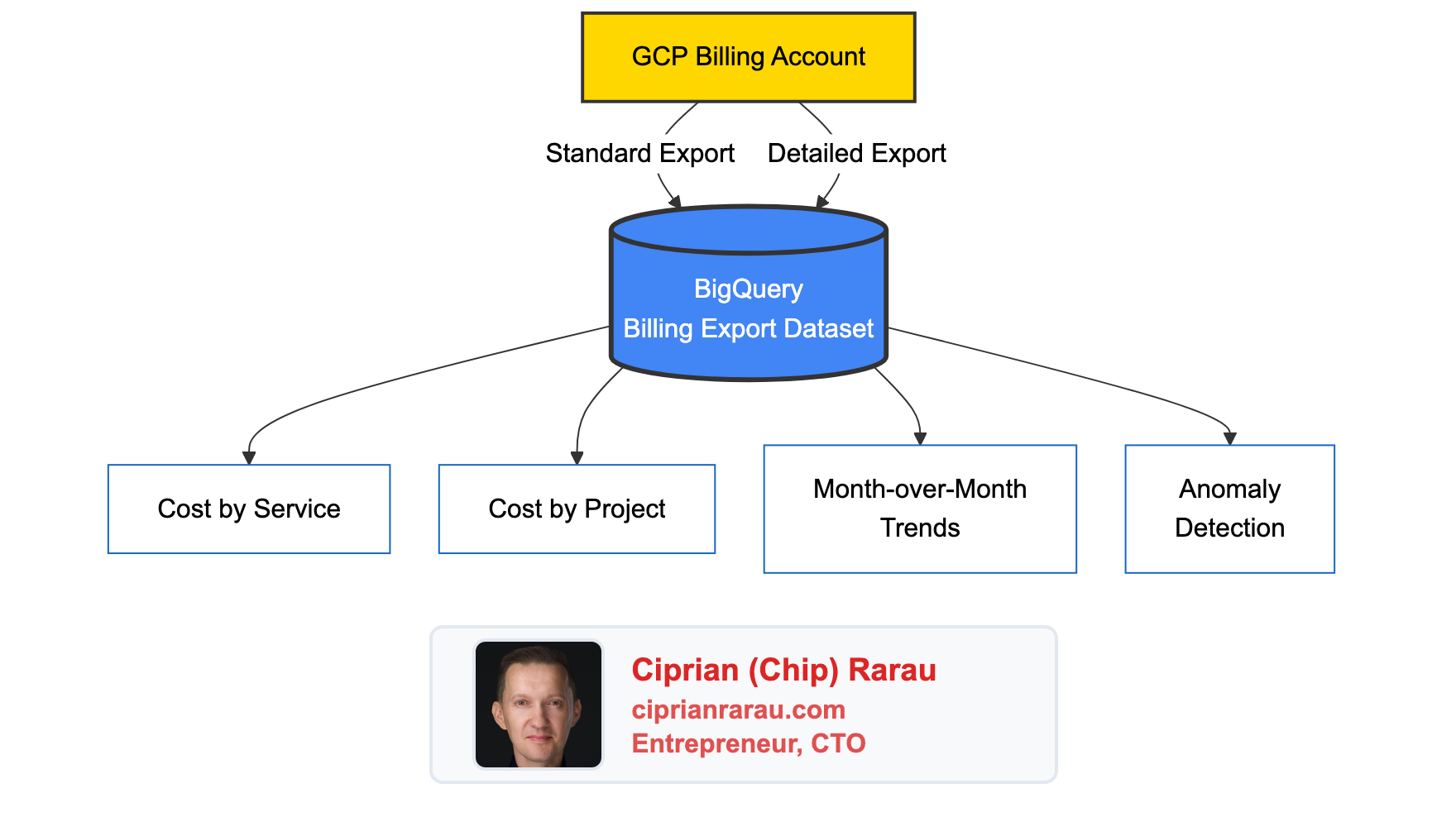
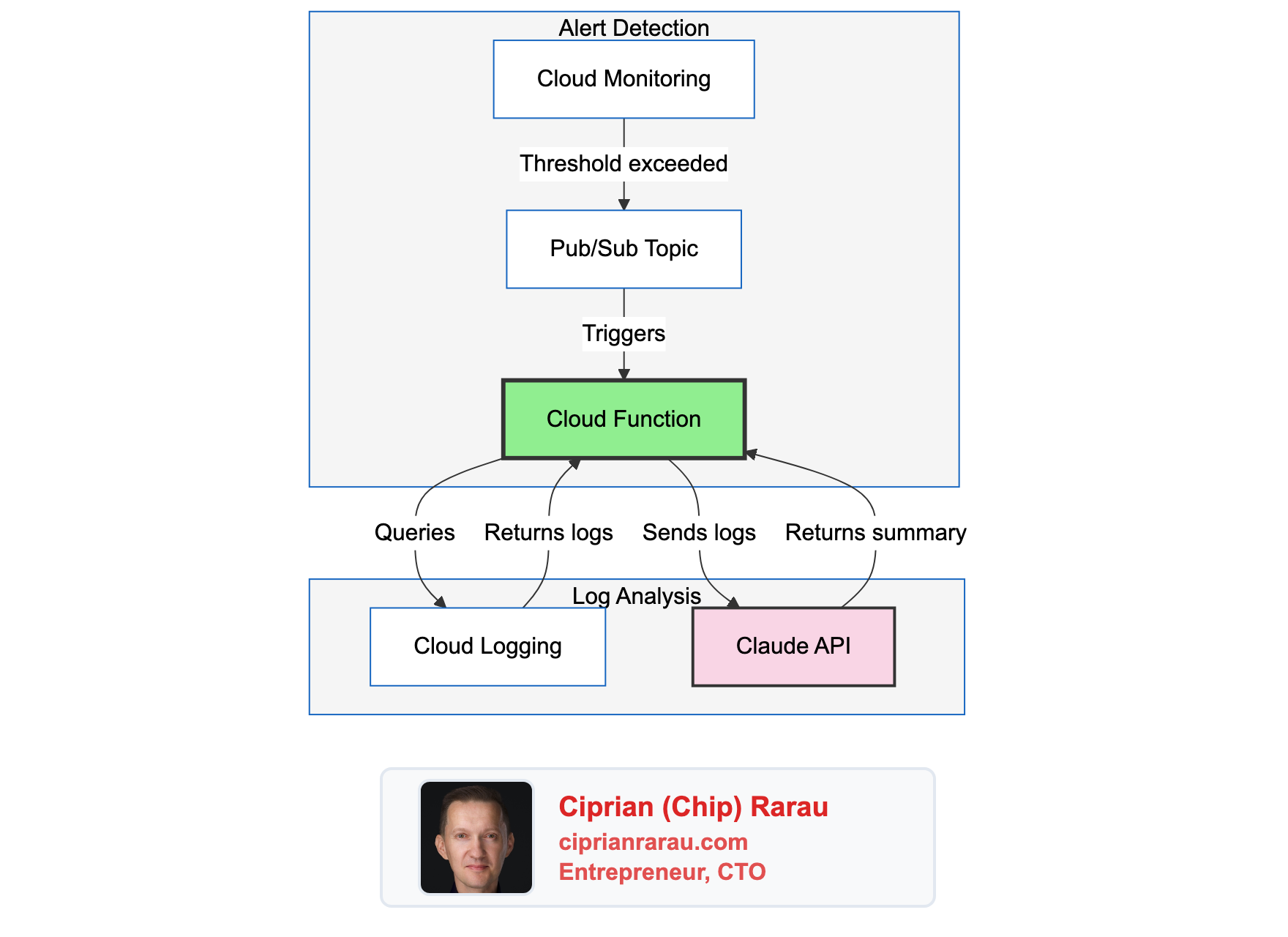
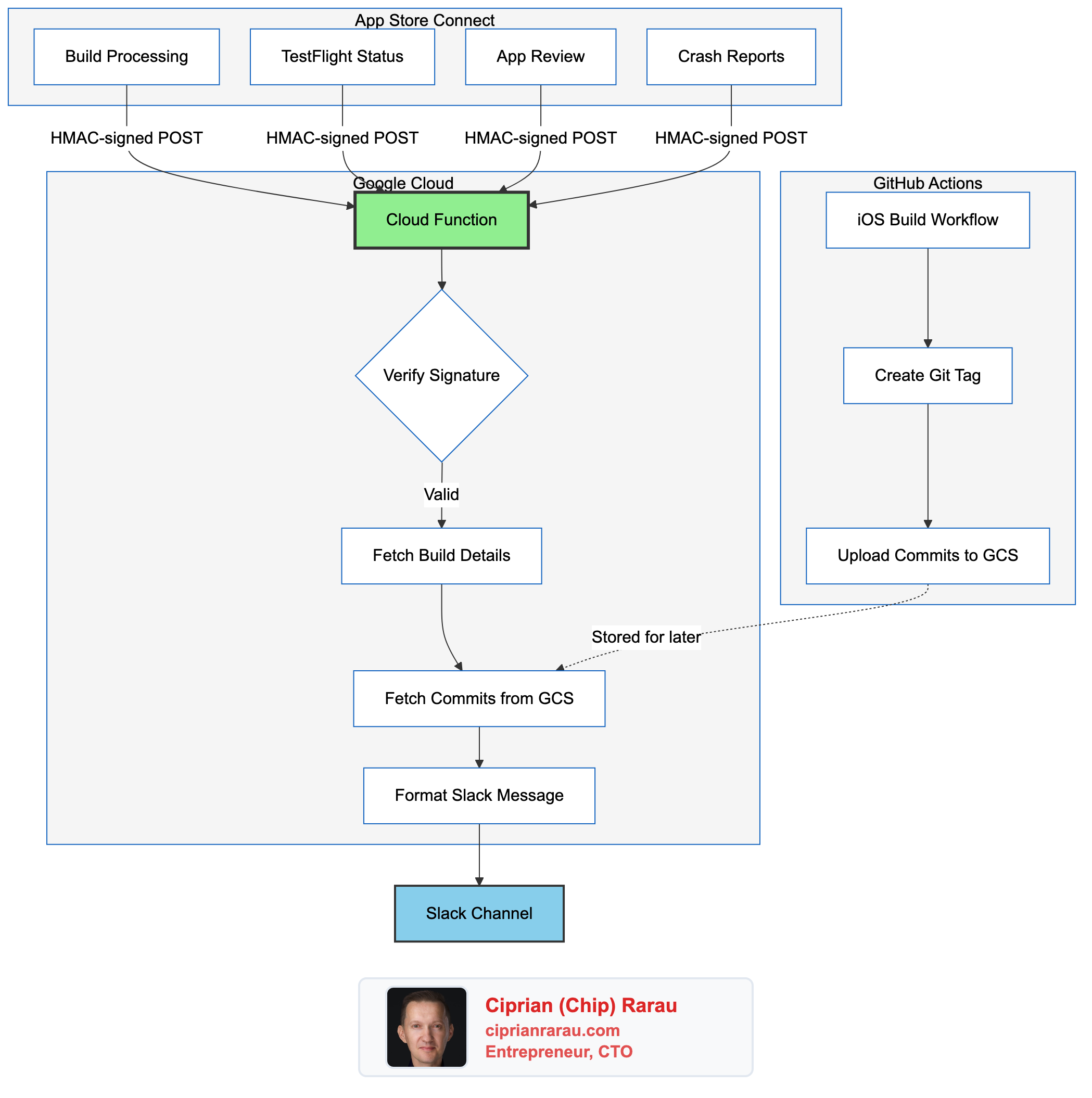
The Slack token is shared across multiple systems:
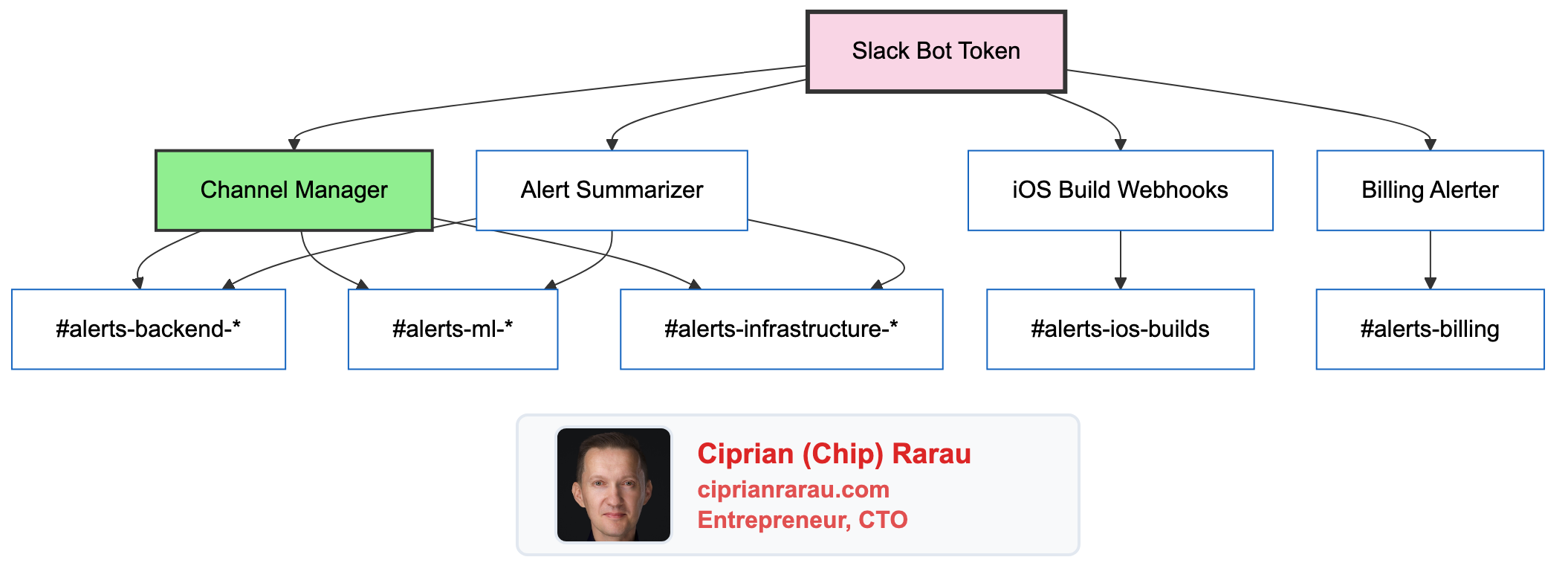
One bot, one token, multiple purposes:
- Channel Manager: Adds users to channels
- Alert Summarizer: Posts AI-analyzed alerts
- iOS Webhooks: Posts build notifications
- Billing Alerter: Posts cost warnings
Required Slack OAuth Scopes
channels:manage         # Create and manage public channels
channels:join          # Join public channels automatically
channels:read          # List and read channel info
channels:write.invites # Invite users to public channels
chat:write             # Post messages
users:read             # Read user information
users:read.email       # Look up users by email
groups:read            # List private channels
groups:write.invites   # Invite users to private channels
Key Design Decisions
Why YAML Configuration?
| Manual Slack | YAML Configuration |
|---|---|
| Click through UI per user | Add line to file |
| No audit trail | Git history |
| Easy to forget channels | Roles ensure completeness |
| Can’t replicate | Script is idempotent |
| ”Can you add me to…?” | Self-service via PR |
Idempotent Operations
The script is safe to run repeatedly:
if "already_in_channel" in str(e):
    return "already_member"
Already a member? Not an error. Just skip. Run it daily if you want.
Role Composition
Users can have multiple roles:
- email: chip@company.com
  roles:
    - backend_developer
    - devops
    - ios_developer
The script computes the union of all channel access. Chip gets backend channels + devops channels + iOS channels.
No Removal by Design
The script adds users to channels but never removes them. Removal is a manual, deliberate action. This prevents accidental lockouts if someone’s role changes in the config.
Directory Structure
devops/
└── slack/
    ├── manage_channels.py   # Python implementation
    ├── config.yaml          # Roles and users
    ├── run.sh               # Wrapper that extracts token
    ├── requirements.txt     # pyyaml, requests
    └── README.md           # Documentation
The Philosophy
Access control is infrastructure. It should be:
- Declared, not clicked
- Version controlled
- Self-documenting
- Reproducible
- Auditable
When someone asks “who has access to production alerts?”, the answer is in config.yaml:
# Everyone with these roles:
- backend_developer  # alerts-backend-production
- ml_developer      # alerts-ml-production
- devops             # alerts-infrastructure-production
No digging through Slack settings. No “I think I added them?” The config is the truth.